Your Mac had a busy night.
You closed the lid and walked away. Nightwatch tells you the rest of the story: when it really fell asleep, every time it stirred in the dark and why, which apps held it awake, and where the battery went.
Pay once · macOS 14+ · Apple silicon & Intel · No admin password · ~4 MB download · Already bought? Download Nightwatch
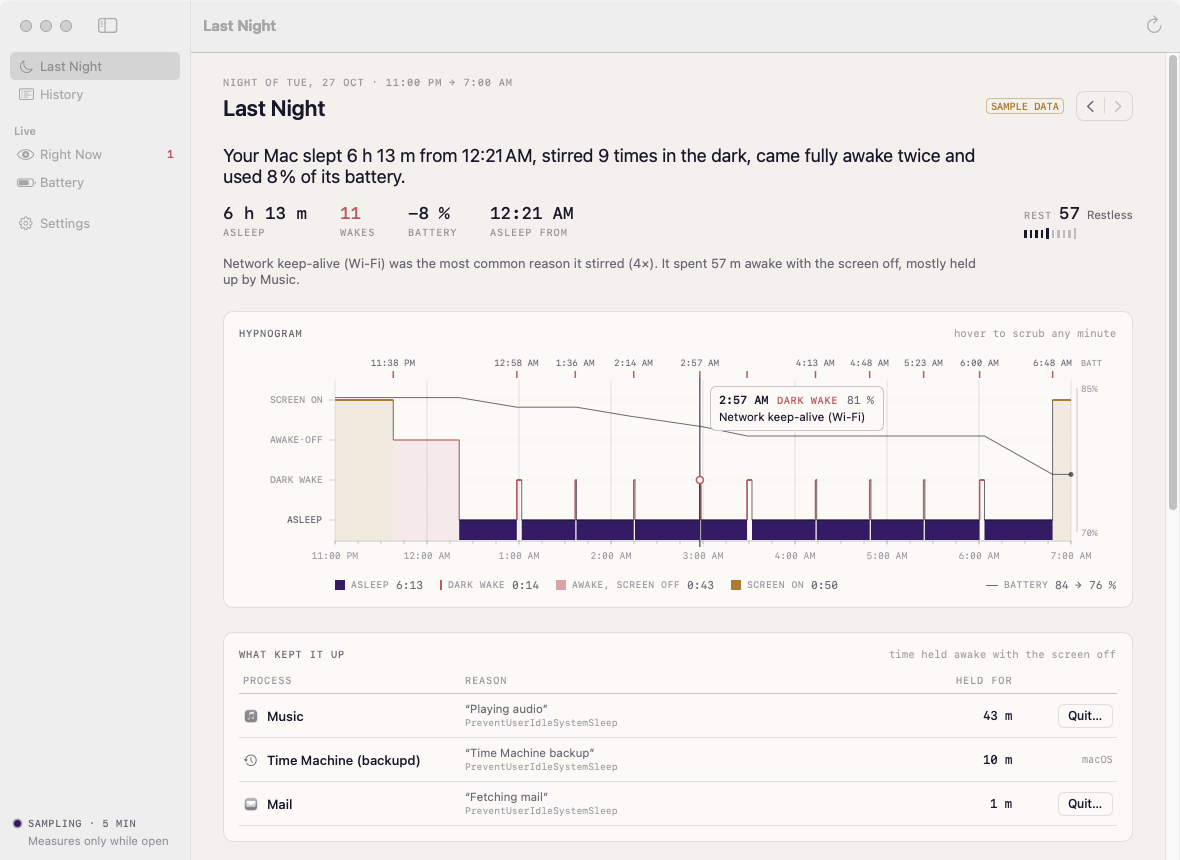
A working model, not a video. It shows a sample week, not your Mac: the page can’t read your power log. The real app reads it with pmset the moment it opens.
- Pay once, no subscription
- No account
- Read-only: never changes settings
- Native on Apple silicon & Intel
- 14-day refund
The night, from dusk to dawn.
Nightwatch reads the power history macOS already keeps and turns it into a short, plain-English story of each night.
A score for every night
One sentence — how long it slept, how often it woke, how much charge it lost — plus a 0–100 rest score you can compare night to night.
A timeline you can read
A hypnogram coloured by state — asleep, dark wake, awake with the screen off, screen on — with the battery level drawn over it.
What woke it
Raw wake codes like rtc/Maintenance or E_RX_IP_PACKET become “Power Nap” or “Network keep-alive”. The original line is one click away.
What kept it up
Apps and services that blocked sleep while your screen was off, ranked by how long they held on.
Energy by app
While it runs, Nightwatch samples each app’s energy use and splits the overnight drain between them. Clearly labelled as an estimate.
Right now
See which apps are stopping sleep at this moment, and quit a misbehaving one — after you confirm.
Battery health
Charge, cycle count, capacity versus new, temperature, and a chart of how much each night cost.
History that lasts
macOS forgets after about a week. Nightwatch keeps each night it reads, so you can look back over 7 or 30 nights.
In your menu bar
Last night’s summary at a glance. The moon changes when something is keeping your Mac awake.
Comparing battery apps? Read the guide: the best battery monitor apps for Mac
No root. No kernel extension. No guessing.
Every Mac records sleeps, wakes and their reasons in its power log. Nightwatch reads it with pmset -g log, checks live sleep blockers with pmset -g assertions, and reads battery details from the system.
Pick your night window in Settings (11 PM to 7 AM by default). For per-app energy, let Nightwatch open at login so it can take a sample every few minutes overnight. Nightwatch never changes your power settings.
EC.LidOpenYou opened the lidYourtc/MaintenanceMaintenance / Power NapDark wakeE_RX_IP_PACKET ARPTNetwork keep-alive (Wi-Fi)Dark wakePreventUserIdleSystemSleepMusic kept it awake 43 mKept upEvery screen, light and dark.
Screenshots straight from Nightwatch, with sample data. Flip between light and dark.


What stays. What connects.
Nightwatch only reads. It never changes how your Mac sleeps.
Stays on your Mac
Your Mac’s nights, and everything Nightwatch works out about them.
- ✓Your power logRead with pmset, never changed
- ✓Every night it readsKept on your Mac, so history outlasts macOS’s week
- ✓Per-app energy samplesMeasured on your Mac while Nightwatch is open
- ✓How you use itNo analytics or tracking in the app
Connects
Two small requests, over HTTPS.
- 1License checkYour key and an activation ID, to Dodo Payments
- 2Update checkApp name and version, to
nightwatch.newmac.app
The full list, for every app, is in the privacy policy.
Pay once. Keep it.
One payment, no subscription. Choose how many Macs you’ll use Nightwatch on.
3 Macs
For your home and work Macs
Checkout opens soon. The buttons above go live here the moment it does.
Every plan includes
- One payment, no subscriptionEvery feature, yours to keep.
- License key by emailSent the moment you pay. Activate in one click.
- Move between MacsUse “Deactivate this Mac”, then activate on the new one.
- Free updatesNew versions install themselves.
- 14-day refundNot for you? Read the refund policy.
- macOS 14 or laterNative on Apple silicon & Intel.
Already bought? Download Nightwatch · .zip · Install help
Questions, answered.
What’s a “dark wake”?
Your Mac briefly wakes with the screen off to check mail, sync, back up or keep network connections alive, then goes back to sleep. A few are normal; dozens a night are worth a look.
Why is the energy-by-app section empty?
Per-app energy can only be measured while Nightwatch is running. Turn on “Open at login” in Settings and it will fill in after the next night. Sleep, wake and “kept awake” details work regardless, because they come from macOS’s own log.
How accurate is the battery split between apps?
It’s an estimate: each app’s share of the energy Nightwatch measured, applied to the battery percentage lost. Processes owned by macOS itself can’t be measured without admin rights, so they aren’t included.
Does it work on a Mac without a battery?
Yes. On an iMac, Mac mini or Mac Studio you get the timeline, wake reasons, score and “kept awake” list; battery sections simply stay out of the way.
Will it change my sleep settings?
No. Nightwatch only reads. The one action it offers is quitting an app that’s keeping your Mac awake, and it asks you first.
macOS says it can’t verify the developer.
Nightwatch is distributed directly from this website. Here’s how to open it the first time.
Is there a free trial?
No. Use the working model at the top of this page, or watch the demo video, to see exactly how Nightwatch works. If it turns out not to be for you, you can ask for a refund within 14 days — see the refund policy.
Can I use Nightwatch on more than one Mac?
Yes. The 3-Mac and 5-Mac plans cover several Macs with one license key. Any license can move to a new Mac: choose “Deactivate this Mac” in Nightwatch on the old one, then activate on the new one.
See what happened last night.
It reads the week macOS already remembers, so your first story is ready the moment it opens.